Invoices · onboarding · support triage · contracts · software delivery
WorkflowHub is a durable, queue-based work system, and what it produces is authored metadata about your process. Agents and people work the same items together: the engine moves them, rules enforce what each side may and may not do, and a person holds every gate that matters. You identify the business process; AI helps you design the workflow; you supply the rules, the tokens and the models — local or hosted. Work gets done.
C# / .NET 10 · PostgreSQL 16 + pgvector · REST API · MCP server · React SPA
Each queue is staffed by whoever should do that step. At every hop the rules pick the next queue — which may be a different agent, or a person. A queue a person holds is the checkpoint.
The model
Six nouns. Learn these and the rest of the platform is mechanical.
BeforeWorkItemRouted),
evaluates scenarios, and acts: require a field, hide a field, cancel the transition, send mail,
write a note, or route the item itself.The load-bearing rule: one lifecycle, one workflow. Because an item carries its whole life on one record, the engine can assert “this item followed the process” rather than trusting whoever moved it.
A gate is a BeforeWorkItemRouted rule with a cancel action. You change process by authoring, not deploying.
Collaboration, concretely
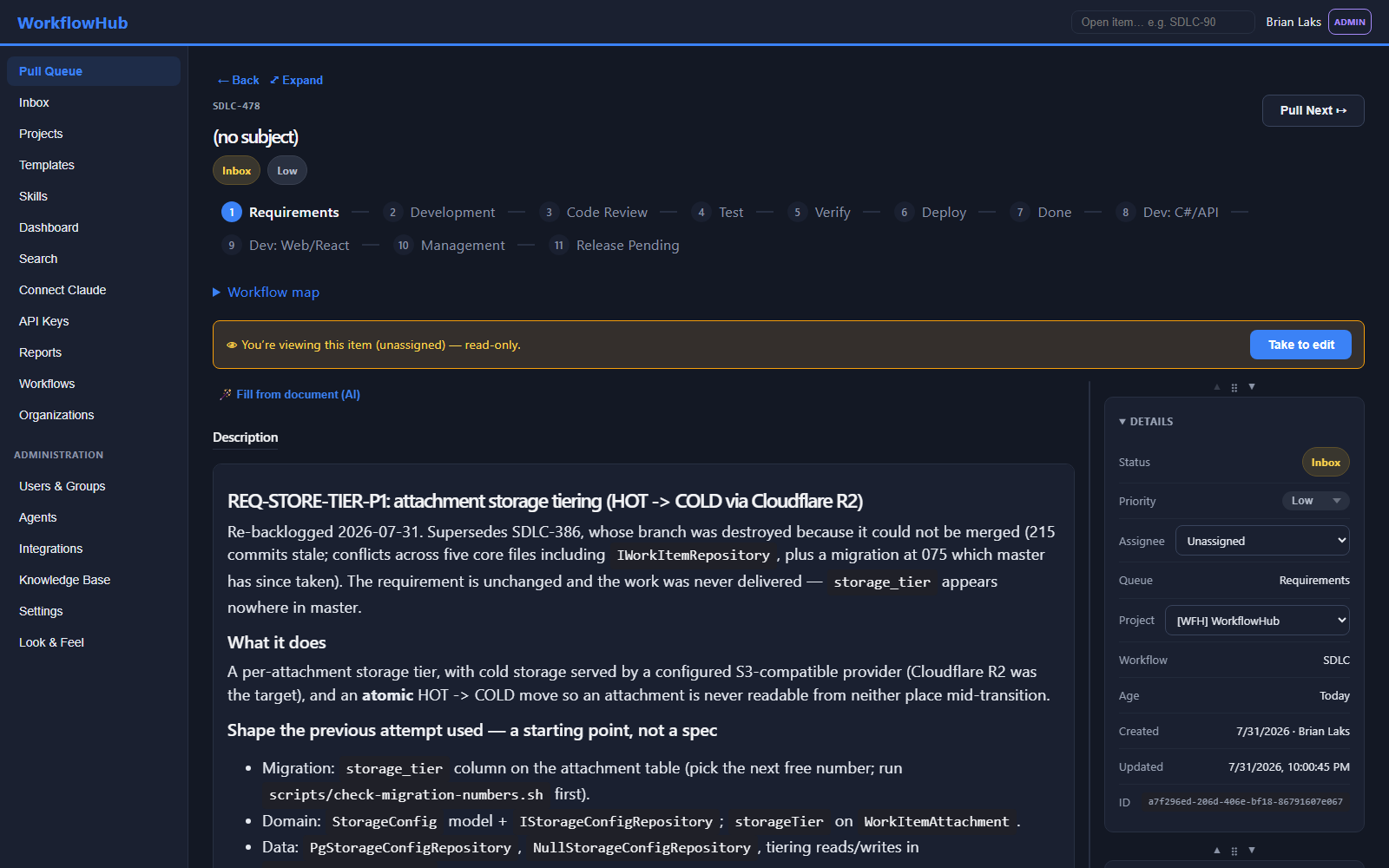
A process only works if the person doing it knows what is expected of them right now. So the item does not merely refuse to move. It marks the tab, boxes the field in gold where it lives, says in the words of your process why it matters, and re-checks after every save. This is one real stage of a real workflow.
OUT-O1: a work item records WHY it finished, not just THAT it finished
Taken — it's yours to edit now.
Save changes — the route re-checks its gate on every save.
The gate below re-checks after every save. Fields marked • gold on the form must be filled in first: DeployApproved, VerificationNotes, VerifyOutcome, VisibleWhere, ClosureReason.
This stage sets VerifyOutcome. Its value picks the destination.
backward — sends the work back to be redone
VerifyOutcome = Fail
VerifyOutcome = Pass
🔒 VerificationNotes is empty. Nothing may enter the release queue unverified — write what you checked and what you saw, then route.
🔒 VerificationNotes never mentions the acceptance criteria. Address each criterion by name and say what you actually ran — “the commit is pushed” is not verification.
🔒 If it isn't visible in an interface, it isn't done. Fill VisibleWhere: name the screen an operator would see this change's state on.
Finishing routes this item off the board. The outcome records WHY it finished and cannot be changed afterwards.
Override direction 👤 human onlyThe rail shows every stage this item has passed, where it sits now, what comes next, and which step ahead is a human checkpoint. It is generated from the workflow you authored, so it is never out of date with the process.
Not “validation failed”. The message names the field, says why the process wants it, and tells the person what to write — because those sentences are authored on the workflow alongside the rule that enforces them.
One outcome value per route, one sentence each. Backward is marked backward so a reject is never mistaken for progress, and a human-held step is marked human before anyone reaches it.
What this stage must produce, the evidence it owes, and where each outcome sends the item — the person reads it as a form, the agent receives it as a queue contract. One authored source, two audiences. That is what makes the hand-off between them seamless: neither is working from a different copy of the process.
And when it is not obvious what should go in a field, Fill from document (AI) reads the attached source and proposes the values — the person stays the one who accepts them.
The unit of work
A work item is one durable row plus everything attached to it. Half of what it carries is defined by its type; the other half is universal and behaves identically in every workflow you will ever author.
Field values are bound to the type's field definitions — which is why an item can never be re-typed or re-homed.
Why put AI here instead of in a chat window
Everyone has tried handing work to an AI and watched it go wrong in the same few ways. None of those are model problems — a better model fails the same way, just more convincingly. They are process problems, and a process is the thing this product actually gives you.
The most expensive failure, because it looks like success. You find out weeks later.
What stops it: a step can refuse to hand the work on until the proof is actually there — the file attached, the test output pasted in, the reference that can be checked against the real system. An AI that claims work it did not do simply cannot move the item forward. It gets stuck, in the open, where somebody sees it.
A vague request produces confident, useless work. Usually you only find out at the end.
What stops it: each step states one thing it exists to produce, the evidence it owes, and where each answer sends the work next. There is nothing to interpret and nothing to guess. A person working that step sees the same thing as a form.
Ask the same AI to check its own work and it agrees with itself. Of course it does.
What stops it: checking is a separate step, done by a separate session that never saw the first one work. It reads what was produced, not the reasoning that produced it — which is the only way a second opinion is worth anything.
Give an AI everything you own as background reading and you pay for all of it, every time, and it gets worse at finding the part that mattered.
What stops it: each step carries only its own instructions and documents. A step about invoices never receives the HR policy. Less to read is cheaper and more accurate — and it is decided by how the step is set up, not by asking the AI to please ignore things.
Fine while it is drafting. Not fine when it pays an invoice, emails a customer, or changes a live system.
What stops it: the steps that carry consequences are held by a person, and an AI is simply refused when it tries to move work out of one — no matter what it has been told or what access it has. That refusal is enforced by the system, not by the AI's own good behaviour.
Every session starts from nothing. Whatever last week's session worked out is gone.
What stops it: what gets worked out is written into a shared, curated store that the next session is handed before it starts. The organisation gets better at the job even though the AI itself remembers nothing.
None of this is AI-only machinery. A step worked by a person shows the same brief, the same required fields and the same refusals — because a step is set up once, and then given to whoever should do it.
Oversight
Autonomy is useful right up to the moment something has consequences. Three independent mechanisms decide where that line sits, and all three are enforced server-side — the agent's own tooling never gets a vote.
The escape hatch is deliberate and visible: one workflow-level variable opts a specific workflow's agents into routing past its manual queues. It is off by default, it is authored, and it is auditable — which is the whole point.
Whether the caller is an agent is decided by the auth middleware; whether the queue is a checkpoint is persisted on the queue. Neither is negotiable at run time.
The platform underneath
Workflows are authored through a designer and an API, not compiled. Adding a stage, a field, a gate or a routing rule is a data change.
15 field types — text, combo, checked list, date, attachment, user picker, grid, sub-item, button — laid out on tabs, one per stage, with list values sourced statically or from a query.
Choose the model per queue: a cheap local model on a triage step, a strong hosted one where the judgement is hard. Bring your own keys, or point a queue at a model running on your own hardware. Cost and outcome are recorded per stage, so which model is worth it here is a measured answer.
37 actions over 11 triggers, evaluated against scenario criteria: require, hide, default, cancel the action, email, run a query, add a note, enable or disable a routing option, or route the item.
An idempotent ingestion port turns a file, mail or event into a work item; the knowledge corpus is chunked and embedded in pgvector, searchable by agents and people, with a browsable index for when search is the wrong question.
Group items across workflows, declare dependencies, get a computed schedule and the items driving the finish date. Project templates compose whole workflows as gated stages.
A second façade over the same API, so any MCP-capable model can claim work, read its context, write fields, file notes, search knowledge and report outcomes as itself — with the audit trail naming it.
Worked examples
We build our own software this way, and that is the one we can show receipts for — but it is one workflow, not the product. The engine does not care what the work is about.
Invoices arrive by email and nobody can say how long approving one takes, or which vendors cause the rework.
The rule that matters: low-confidence extraction goes to a person, and nothing reaches the finance system without an approval decision.
It fails in the seams — HR thinks IT has it, IT is waiting on Facilities, and the new hire has no laptop on Monday.
The rule that matters: nobody is declared ready without accounts, payroll and a briefed manager — and the schedule tells you on Wednesday if Monday is at risk.
Volume is the problem, not difficulty. The good answer already exists in something a colleague wrote last year.
The rule that matters: if a person rewrites the draft they must say what was wrong with it — a month of those is a ranked list of what your knowledge base is missing.
The reading cannot be skipped. The extraction, the clause-flagging and the chasing absolutely can.
The quiet win: renewal dates become real data, so a review opens ninety days before an auto-renewal rolls instead of after it.
Our own features are written, reviewed, tested and shipped by AI working a WorkflowHub workflow.
The rule that matters: nothing passes review without a real, checkable commit, and no release happens without a person authorising it.
Help-desk tickets · contact-centre cases · chasing customer documents until every required value is there · claims and applications · inspection rounds · change-approval boards · cleaning up a document library so what your AI reads has been checked. If your team does it by hand every week, and it has steps, evidence and a decision, it fits.
Architecture
Every consumer — the React SPA, an MCP-connected agent, an ingestion source, your own integration — goes through the same REST API with the same authorisation. The SPA holds no database credential. MCP is a façade over the API, not a parallel path.
Author the workflow once. Agents work it around the clock, evidence accumulates on the item, and you keep the decisions that deserve a person.